How to Add Videos to WooCommerce Products
You can add videos to WooCommerce product galleries without an extra plugin. Since version 11.1, WooCommerce has a built-in Product gallery videos setting that lets you add videos from your Media Library to a product's gallery, next to its images. The Nectarblocks theme shows these videos in every Single Product Gallery Type.
WooCommerce added product gallery videos in version 11.1 (September 2026) as an experimental feature, and it is turned off by default. WooCommerce is expected to make it a standard, on-by-default feature in an upcoming release. Until then, turn it on yourself with the steps below.
Requirements
- WooCommerce 11.1 or later.
- Nectarblocks theme 3.4.0 or later.
- Videos uploaded to your Media Library. Videos hosted on YouTube, Vimeo or other services aren't supported. MP4 (H.264) plays in the widest range of browsers.
Step 1: Turn on WooCommerce product gallery videos
- In the WordPress admin, go to WooCommerce → Settings → Advanced → Features.
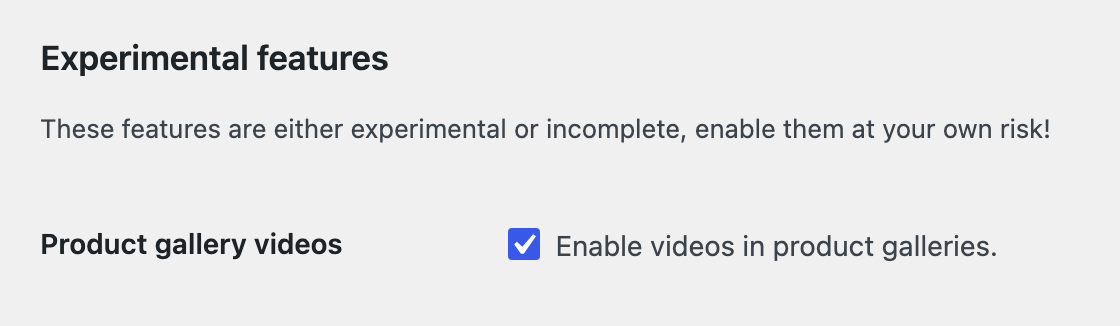
- In the Experimental features section, check Product gallery videos.
- Click Save changes.
Step 2: Add a video to a WooCommerce product
- Edit the product.
- In the Product gallery box, click Add media to product gallery. With the feature turned off, this link reads Add product gallery images instead.
- Select the video, along with any images you want to add, and click Add to gallery.
- Drag the gallery items into the order you want, then click Update or Publish.
Keep an image as the Product image. Videos only go in the product gallery.
Set a poster image for the video
The poster is the still image shown before a video starts and in the gallery thumbnails. WooCommerce uses the video's featured image:
- Go to Media → Library and open the video.
- Click Edit more details.
- Set a Featured image, then click Update.
Set a poster for every gallery video. Without one, some browsers, including Safari, show a blank thumbnail.
How product videos display in the Nectarblocks theme
Gallery videos play automatically, muted and on a loop.
- Bottom Thumbnails Slider and Left Thumbnails + Sticky Product Info: a video plays while its slide is showing and pauses when you move to another slide. Its thumbnail shows the poster with a play icon.
- 2 Column Images + Sticky Product Info: a video plays while it's on screen and pauses when you scroll past it.
- Default WooCommerce Gallery: WooCommerce's own gallery handles playback.
With Product Gallery Locked To Aspect Ratio turned on, videos in the slider and 2 Column gallery types are cropped to the same aspect ratio as your images. In the Default WooCommerce Gallery they keep their own shape.
Frequently asked questions
Can I add a video to a WooCommerce product without a plugin?
Yes. WooCommerce 11.1 and later include the Product gallery videos setting. It is experimental and turned off by default, so turn it on first under WooCommerce → Settings → Advanced → Features.
Can I add a YouTube or Vimeo video to a WooCommerce product gallery?
Not with the built-in feature. It only plays videos uploaded to your Media Library, so upload the video file itself instead.
Which video format should I use for WooCommerce product videos?
MP4 with H.264 video plays in the widest range of browsers. Keep product videos short and compressed so product pages load quickly.
Can a video be the main product image?
No. The Product image has to be an image. Add videos to the product gallery instead, where they show after the product image.
Do WooCommerce product videos play automatically?
Yes. Gallery videos play muted and on a loop. In the Nectarblocks slider and 2 Column gallery types, a video only plays while you can see it.
Why is my product video thumbnail blank?
The video has no poster image. Safari and some other browsers can't show a thumbnail for a video without one. Set a poster image to fix it.
Can I add videos to product variations?
Not yet. While the feature is experimental, WooCommerce doesn't include videos in variation galleries.
Good to know
- WooCommerce also leaves videos out of product CSV import and export and the REST API while the feature is experimental. Its Adding Product Images and Galleries guide has the latest details.
- Product quick view shows the product's images only.
- WooCommerce may change experimental features between releases.
Related
- Single Product: the Single Product Gallery Type, gallery width and aspect ratio options.
- WooCommerce Templates: design product pages with the Theme Builder.