Ticker

The Ticker block scrolls its contents in a seamless, never-ending loop — perfect for logo strips, announcements, testimonials or any content you want to keep moving across the screen. Each piece of content lives in a Ticker Item child block, and you can add as many items as you like.
Sidebar Controls
Layout
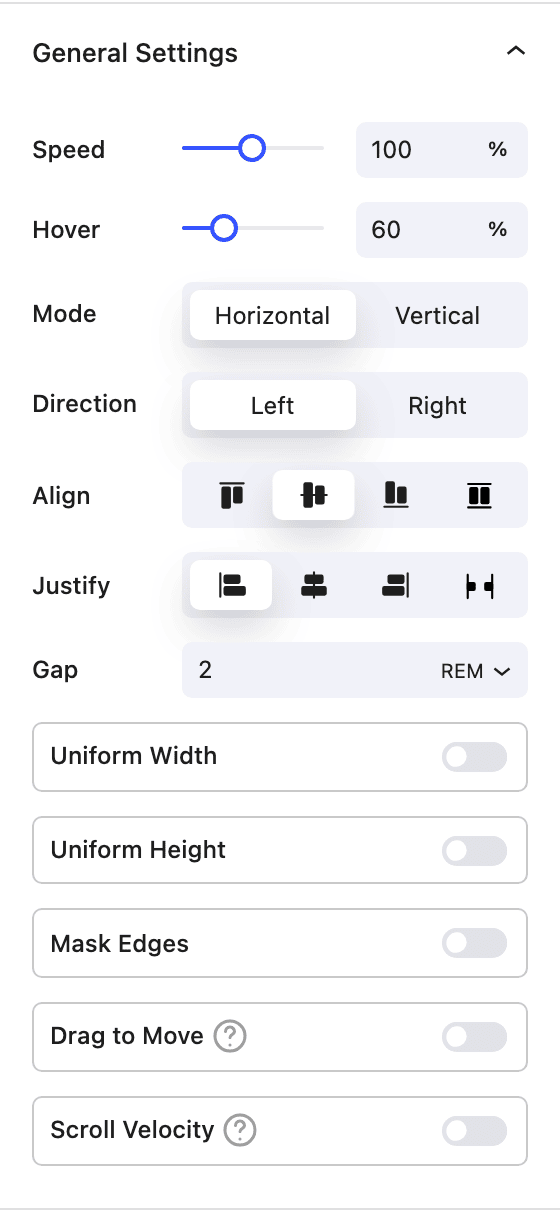
- Speed Set the scroll speed as a percentage (100% ≈ 18 seconds to cross the container). Lower is slower, higher is faster.
- Hover A speed multiplier applied while a visitor hovers over the ticker — set it below 100% to slow down on hover, or 0 to pause.
- Mode Scroll
Horizontal(left/right) orVertical(up/down). - Direction Choose the travel direction for the current mode (Left/Right, or Up/Down).
- Align / Justify Control how items line up across and along the ticker.
- Gap The space between each item.
- Uniform Width / Uniform Height Force every item to a fixed width and/or height for an even, grid-like strip.
- Mask Edges Fade the content out at the edges of the container.
- Drag to Move Let visitors drag the ticker to scrub through its contents (front end only).
- Scroll Velocity Speed the ticker up as the visitor scrolls the page. Dynamic Direction makes the ticker follow the scroll direction.
Ticker Item
Each Ticker Item is a content section inside the ticker and can hold any blocks you like (text, images, buttons, icons and so on). Its own settings cover Align / Justify of the item's contents, plus the shared Size, Spacing, Position and Effects / Transform controls. A Go to Parent Settings shortcut jumps back to the Ticker's controls.
How it works
On the front end the ticker clones its items as many times as needed to fill the container, producing a gap-free, continuous loop. Lazy-loaded images inside the ticker are pre-decoded to avoid layout shifts, and the loop recalculates automatically when the window is resized.
Block Controls Available
The following are common Nectar Block controls which are used in other blocks as well as the Ticker block.
- Size
- Spacing
- Border
- Position
- Display
- Overflow
- Effects / Transform
- Animations