Taxonomy Terms

The Taxonomy Terms block shows taxonomy terms (e.g. categories, tags, or custom taxonomies) for the current post in context. Unlike the Taxonomy Grid block, which displays a grid of posts filtered by taxonomy, this block simply outputs the terms assigned to the post being viewed—ideal for single post templates, meta lines, or “Filed under” sections.
Where to use it
Use Taxonomy Terms in single post or page templates (or anywhere the “current post” is defined) so that the correct terms appear for each post. If you use it outside a single-post context, behavior depends on your theme and template.
Sidebar controls
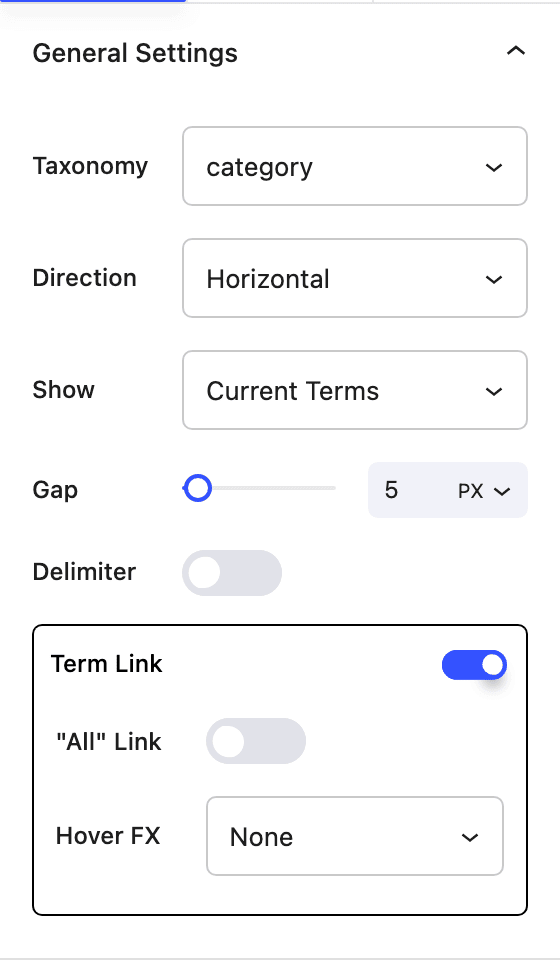
General settings
- Taxonomy Select which taxonomy to display (e.g. Categories, Tags, or a custom taxonomy).
- Direction Lay out terms horizontally or vertically.
- Show Choose which terms to display:
- Current terms – Terms assigned to the current post.
- Current parent terms – Only parent terms for the current post.
- All terms – All available terms from the selected taxonomy (not filtered by the current post).
- Parent terms – Only parent-level terms from the taxonomy (all top-level terms, not filtered by current post).
- Gap Spacing between terms (px or em), with responsive overrides.
- Delimiter (when direction is horizontal) Toggle a delimiter between terms (e.g. comma or slash).
- Term Link Enable or disable linking each term to its archive.
- "All" Link Option to show an “All” link.
- Hover FX Hover effect for term links (e.g. None, Underline, Reveal).
Settings are responsive where applicable (desktop, tablet, mobile).
Block controls available
The following Nectar block controls are available on the Taxonomy Terms block:
- Display
- Background
- Border
- Border Radius
- Position
- Spacing
- Font Color
- Typography
- Alignment
- Effects / Transform
- Animations