Search

The Search block adds site search to your layout, either as a tap-to-open popup or an always-visible inline field. With AJAX search enabled it shows live results as the visitor types — complete with featured images, post type labels and excerpts. It's commonly placed inside the Header Actions block, but works anywhere.
Sidebar Controls
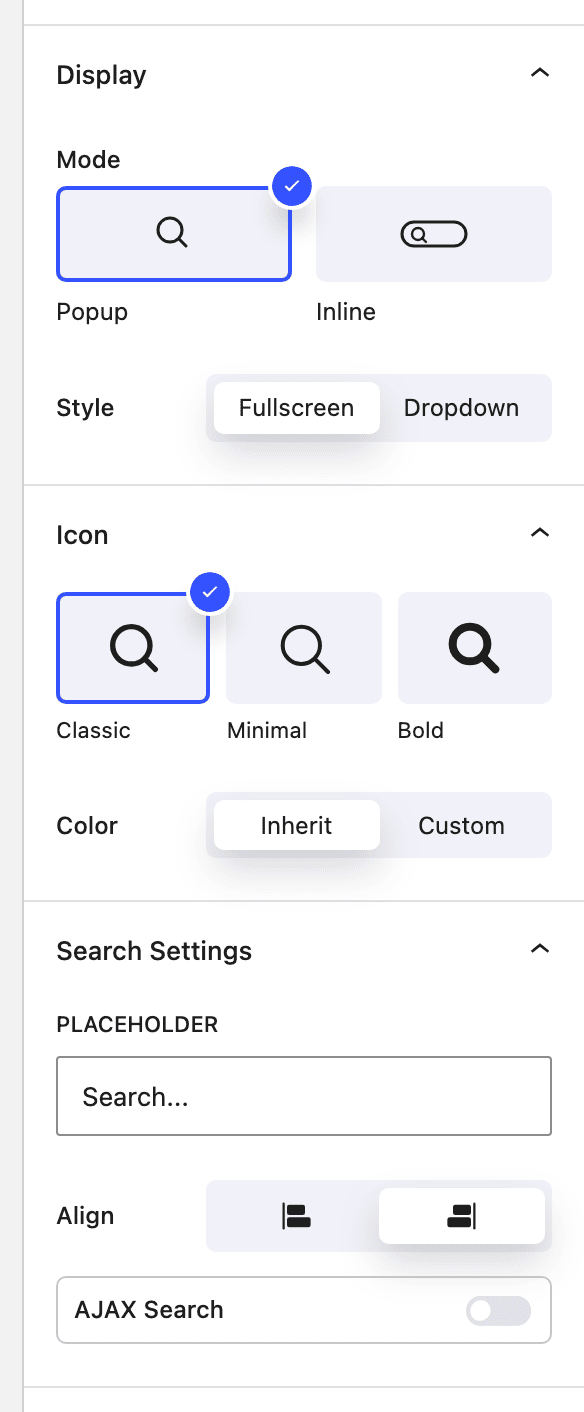
Display
- Mode Show search as a
Popup(an icon that opens a search field) orInline(an expanded field with results below it). Can be set per device. - Style For popup mode, expand to
Fullscreenwith an overlay, or a compactDropdownbeneath the icon.
Icon
- Icon Style Choose the search icon:
Classic,MinimalorBold. - Color
Inheritthe surrounding text color, or set aCustomcolor.
Search settings
- Placeholder The hint text shown inside the search field.
- Align Which side the results panel aligns to.
- AJAX Search Show live results as the visitor types. When enabled:
- Limit to post type — restrict results to a single post type, or search all.
- Featured image — show each result's thumbnail.
- Post type — show a label for each result's post type.
- Description — show a short excerpt under each result.
- Plus color controls for the result text, hover background and divider.
Input styling
Style the field's width, background, text color, border and border radius — with separate Default and Focus states so the field can change appearance when active.
How it works
The popup and inline experiences are fully responsive — you can use a popup on desktop and an inline field on mobile, for example. When AJAX search is on, keystrokes are debounced and queried against your site; results render with optional image, post-type label and excerpt, and all returned content is escaped to keep the markup safe.
Block Controls Available
The following are common Nectar Block controls which are used in other blocks as well as the Search block.
- Typography
- Border
- Effects / Transform